Personal Startup Project
ElderCare: On-Demand Care Services Marketplace
Marketplace platform connecting elder care service providers with families across South East Asia - combining Fiverr's service marketplace with Uber's on-demand model
Year
2024
Role
Founder & Lead Developer
Duration
12 weeks
Read Time
11 min read
ElderCare: The Uber for Elder Care Services in South East Asia
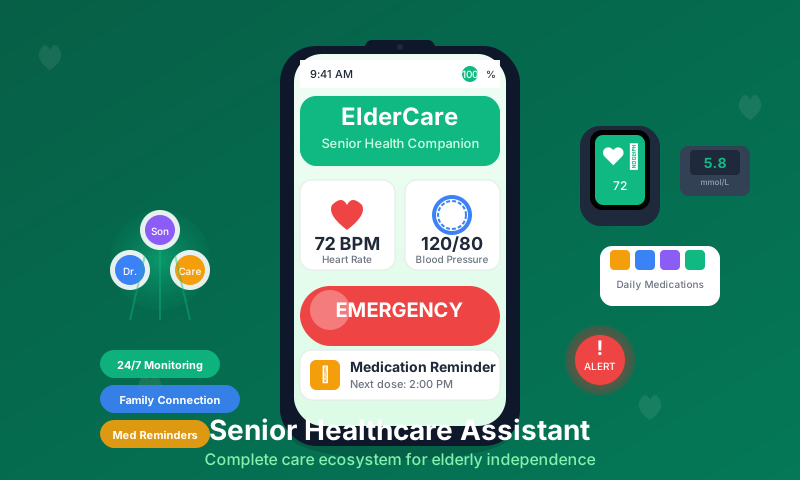
ElderCare is a marketplace platform that connects families with verified elder care service providers across South East Asia. By combining the gig economy model of Uber with the service marketplace approach of Fiverr, we're revolutionizing how families find and book quality care for their elderly loved ones.
Project Overview
With South East Asia's rapidly aging population and the increasing number of families with elderly parents living separately, there's a massive gap in the market for on-demand, trusted elder care services. ElderCare bridges this gap by creating a two-sided marketplace where:
- Families can instantly book verified caregivers for various services
- Care providers can build their business and reach more clients
- Both parties benefit from transparent pricing, ratings, and secure payments
The Elder Care Challenge
Modern senior care faces several technological and social barriers:
- Digital Divide: Complex interfaces intimidating to elderly users
- Health Monitoring: Difficulty tracking multiple medications and appointments
- Family Connectivity: Families wanting to help but respecting independence
- Emergency Response: Delayed response times in health emergencies
- Social Isolation: Technology barriers preventing digital social connection
User Experience Design
Elderly-Focused Interface Design
// components/SeniorFriendlyButton.tsx - Accessibility-first button component
interface SeniorFriendlyButtonProps {
children: React.ReactNode
onPress: () => void
variant?: 'primary' | 'secondary' | 'emergency'
size?: 'large' | 'extra-large'
icon?: string
}
export function SeniorFriendlyButton({
children,
onPress,
variant = 'primary',
size = 'large',
icon
}: SeniorFriendlyButtonProps) {
const buttonStyles = {
primary: {
backgroundColor: '#2E8B57', // High contrast green
color: '#FFFFFF',
borderWidth: 3,
borderColor: '#1F5F3F'
},
secondary: {
backgroundColor: '#F0F8FF',
color: '#2E8B57',
borderWidth: 3,
borderColor: '#2E8B57'
},
emergency: {
backgroundColor: '#DC143C',
color: '#FFFFFF',
borderWidth: 3,
borderColor: '#8B0000'
}
}
const sizeStyles = {
large: {
minHeight: 60,
paddingHorizontal: 24,
paddingVertical: 16
},
'extra-large': {
minHeight: 80,
paddingHorizontal: 32,
paddingVertical: 24
}
}
return (
<TouchableOpacity
style={[
styles.baseButton,
buttonStyles[variant],
sizeStyles[size]
]}
onPress={onPress}
accessibilityRole="button"
accessibilityLabel={typeof children === 'string' ? children : 'Button'}
accessibilityHint="Double tap to activate"
>
{icon && (
<Icon
name={icon}
size={size === 'extra-large' ? 32 : 24}
color={buttonStyles[variant].color}
style={styles.buttonIcon}
/>
)}
<Text style={[styles.buttonText, { color: buttonStyles[variant].color }]}>
{children}
</Text>
</TouchableOpacity>
)
}
// Design system optimized for seniors
const styles = StyleSheet.create({
baseButton: {
flexDirection: 'row',
alignItems: 'center',
justifyContent: 'center',
borderRadius: 12,
marginVertical: 8,
shadowColor: '#000',
shadowOffset: { width: 0, height: 4 },
shadowOpacity: 0.3,
shadowRadius: 8,
elevation: 8
},
buttonText: {
fontSize: 22, // Large, readable font
fontWeight: '600',
textAlign: 'center',
fontFamily: 'System' // Clear, system font
},
buttonIcon: {
marginRight: 12
}
})
Health Tracking Interface
// screens/HealthDashboard.tsx - Main health monitoring interface
interface HealthMetric {
id: string
name: string
value: number
unit: string
status: 'normal' | 'warning' | 'critical'
lastUpdated: Date
trend: 'up' | 'down' | 'stable'
}
export function HealthDashboard() {
const [healthMetrics, setHealthMetrics] = useState<HealthMetric[]>([])
const [todaysMedications, setTodaysMedications] = useState<Medication[]>([])
const [upcomingAppointments, setUpcomingAppointments] = useState<Appointment[]>([])
return (
<ScrollView style={styles.dashboard}>
{/* Simple, large status overview */}
<View style={styles.statusCard}>
<Text style={styles.statusTitle}>Today's Health Status</Text>
<View style={styles.statusIndicator}>
<Icon name="check-circle" size={48} color="#2E8B57" />
<Text style={styles.statusText}>All Good</Text>
</View>
<Text style={styles.statusSubtext}>
Last updated: {formatTime(new Date())}
</Text>
</View>
{/* Quick actions - large, clear buttons */}
<View style={styles.quickActions}>
<Text style={styles.sectionTitle}>Quick Actions</Text>
<SeniorFriendlyButton
variant="emergency"
size="extra-large"
icon="phone"
onPress={handleEmergencyCall}
>
Emergency Call
</SeniorFriendlyButton>
<SeniorFriendlyButton
variant="primary"
size="large"
icon="pill"
onPress={navigateToMedications}
>
View My Medications
</SeniorFriendlyButton>
<SeniorFriendlyButton
variant="primary"
size="large"
icon="calendar"
onPress={navigateToAppointments}
>
My Appointments
</SeniorFriendlyButton>
<SeniorFriendlyButton
variant="secondary"
size="large"
icon="family"
onPress={navigateToFamily}
>
Call Family
</SeniorFriendlyButton>
</View>
{/* Today's medications - visual and clear */}
<MedicationReminders medications={todaysMedications} />
{/* Simple health metrics */}
<HealthMetricsOverview metrics={healthMetrics} />
</ScrollView>
)
}
// components/MedicationReminders.tsx - Medication tracking
export function MedicationReminders({ medications }: { medications: Medication[] }) {
return (
<View style={styles.medicationCard}>
<Text style={styles.sectionTitle}>Today's Medications</Text>
{medications.map((med) => (
<TouchableOpacity
key={med.id}
style={[
styles.medicationItem,
med.taken && styles.medicationTaken
]}
onPress={() => handleMedicationTaken(med.id)}
>
<View style={styles.medicationInfo}>
<Text style={styles.medicationName}>{med.name}</Text>
<Text style={styles.medicationTime}>
{formatTime(med.scheduledTime)}
</Text>
<Text style={styles.medicationDose}>{med.dosage}</Text>
</View>
<View style={styles.medicationStatus}>
{med.taken ? (
<Icon name="check-circle" size={32} color="#2E8B57" />
) : (
<TouchableOpacity
style={styles.takeButton}
onPress={() => markMedicationTaken(med.id)}
>
<Text style={styles.takeButtonText}>Take Now</Text>
</TouchableOpacity>
)}
</View>
</TouchableOpacity>
))}
</View>
)
}
Family Dashboard Integration
// family/FamilyDashboard.tsx - Family member interface
interface FamilyMember {
id: string
name: string
relationship: string
phoneNumber: string
email: string
notificationPreferences: NotificationPreferences
}
interface ElderlyUserStatus {
userId: string
name: string
lastActive: Date
healthStatus: 'good' | 'concerning' | 'urgent'
recentMetrics: HealthMetric[]
medicationCompliance: number
upcomingAppointments: Appointment[]
emergencyAlerts: EmergencyAlert[]
}
export function FamilyDashboard() {
const [elderlyUsers, setElderlyUsers] = useState<ElderlyUserStatus[]>([])
const [notifications, setNotifications] = useState<Notification[]>([])
return (
<ScrollView style={styles.familyDashboard}>
{/* Family members overview */}
<View style={styles.overviewSection}>
<Text style={styles.dashboardTitle}>Family Health Overview</Text>
{elderlyUsers.map((user) => (
<TouchableOpacity
key={user.userId}
style={[
styles.userCard,
user.healthStatus === 'urgent' && styles.urgentCard
]}
onPress={() => navigateToUserDetail(user.userId)}
>
<View style={styles.userHeader}>
<Text style={styles.userName}>{user.name}</Text>
<StatusIndicator status={user.healthStatus} />
</View>
<View style={styles.userStats}>
<StatItem
label="Last Active"
value={formatRelativeTime(user.lastActive)}
icon="clock"
/>
<StatItem
label="Medication Compliance"
value={`${Math.round(user.medicationCompliance * 100)}%`}
icon="pill"
/>
<StatItem
label="Next Appointment"
value={user.upcomingAppointments[0]?.date || 'None scheduled'}
icon="calendar"
/>
</View>
{user.emergencyAlerts.length > 0 && (
<View style={styles.alertBanner}>
<Icon name="alert-triangle" size={20} color="#DC143C" />
<Text style={styles.alertText}>
{user.emergencyAlerts.length} alert(s)
</Text>
</View>
)}
</TouchableOpacity>
))}
</View>
{/* Recent notifications */}
<NotificationsList notifications={notifications} />
{/* Quick family actions */}
<FamilyQuickActions />
</ScrollView>
)
}
// components/EmergencyResponse.tsx - Emergency handling system
class EmergencyResponseSystem {
private emergencyContacts: EmergencyContact[]
private medicalInfo: MedicalInformation
private locationService: LocationService
async initiateEmergency(
userId: string,
emergencyType: 'medical' | 'fall' | 'manual',
location?: Coordinates
): Promise<EmergencyResponse> {
// Get user location if not provided
const currentLocation = location || await this.locationService.getCurrentLocation()
// Create emergency record
const emergencyId = await this.createEmergencyRecord({
userId,
type: emergencyType,
location: currentLocation,
timestamp: new Date(),
status: 'active'
})
// Notify emergency contacts immediately
const contactNotifications = await Promise.all([
this.notifyPrimaryContact(userId, emergencyId),
this.notifySecondaryContacts(userId, emergencyId),
this.notifyMedicalProviders(userId, emergencyId)
])
// Send location and medical info to emergency services if requested
if (emergencyType === 'medical') {
await this.contactEmergencyServices({
location: currentLocation,
medicalInfo: await this.getUserMedicalInfo(userId),
emergencyContacts: await this.getEmergencyContacts(userId)
})
}
// Start continuous monitoring
await this.startEmergencyMonitoring(emergencyId)
return {
emergencyId,
status: 'initiated',
contactsNotified: contactNotifications.length,
estimatedResponseTime: this.calculateResponseTime(currentLocation)
}
}
private async notifyPrimaryContact(
userId: string,
emergencyId: string
): Promise<boolean> {
const primaryContact = await this.getPrimaryContact(userId)
// Send SMS, call, and push notification
await Promise.all([
this.sendEmergencySMS(primaryContact.phoneNumber, emergencyId),
this.initiateEmergencyCall(primaryContact.phoneNumber),
this.sendPushNotification(primaryContact.deviceId, {
title: 'EMERGENCY ALERT',
body: `Emergency situation detected for ${await this.getUserName(userId)}`,
data: { emergencyId, userId }
})
])
return true
}
}
Technical Implementation
Health Data Integration
// services/HealthDataService.ts - Health monitoring and data management
interface HealthDataPoint {
userId: string
type: 'blood_pressure' | 'heart_rate' | 'weight' | 'blood_sugar' | 'medication'
value: number | string
unit?: string
timestamp: Date
deviceId?: string
notes?: string
}
class HealthDataService {
private database: Database
private deviceManager: DeviceManager
private analyticsEngine: HealthAnalytics
async recordHealthData(dataPoint: HealthDataPoint): Promise<void> {
// Validate data point
const validation = await this.validateHealthData(dataPoint)
if (!validation.isValid) {
throw new Error(`Invalid health data: ${validation.errors.join(', ')}`)
}
// Store in database
await this.database.insertHealthData(dataPoint)
// Check for alerts
const alerts = await this.checkHealthAlerts(dataPoint)
if (alerts.length > 0) {
await this.processHealthAlerts(alerts)
}
// Update trends and analytics
await this.analyticsEngine.updateUserTrends(dataPoint.userId)
// Notify family if configured
if (await this.shouldNotifyFamily(dataPoint)) {
await this.notifyFamilyMembers(dataPoint)
}
}
async getHealthTrends(
userId: string,
metric: string,
timeRange: TimeRange
): Promise<HealthTrend> {
const data = await this.database.getHealthData(userId, metric, timeRange)
return this.analyticsEngine.calculateTrends(data, {
smoothing: true,
alertThresholds: await this.getUserAlertThresholds(userId, metric),
normalRanges: await this.getNormalRanges(userId, metric)
})
}
private async checkHealthAlerts(dataPoint: HealthDataPoint): Promise<HealthAlert[]> {
const userThresholds = await this.getUserAlertThresholds(dataPoint.userId, dataPoint.type)
const alerts: HealthAlert[] = []
// Check critical thresholds
if (this.isCriticalValue(dataPoint, userThresholds.critical)) {
alerts.push({
level: 'critical',
type: dataPoint.type,
value: dataPoint.value,
threshold: userThresholds.critical,
message: this.generateAlertMessage(dataPoint, 'critical'),
recommendedAction: 'Contact emergency services immediately'
})
}
// Check warning thresholds
else if (this.isWarningValue(dataPoint, userThresholds.warning)) {
alerts.push({
level: 'warning',
type: dataPoint.type,
value: dataPoint.value,
threshold: userThresholds.warning,
message: this.generateAlertMessage(dataPoint, 'warning'),
recommendedAction: 'Contact healthcare provider'
})
}
return alerts
}
}
// services/MedicationManager.ts - Medication tracking and reminders
class MedicationManager {
private scheduler: NotificationScheduler
private database: Database
async scheduleMedicationReminders(
userId: string,
medications: Medication[]
): Promise<void> {
// Clear existing reminders
await this.scheduler.clearUserReminders(userId)
for (const medication of medications) {
// Schedule reminders based on frequency
const reminderTimes = this.calculateReminderTimes(medication)
for (const reminderTime of reminderTimes) {
await this.scheduler.scheduleNotification({
userId,
type: 'medication_reminder',
title: 'Medication Reminder',
body: `Time to take ${medication.name} (${medication.dosage})`,
scheduledTime: reminderTime,
data: {
medicationId: medication.id,
dosage: medication.dosage
},
actions: [
{ id: 'taken', title: 'Mark as Taken' },
{ id: 'snooze', title: 'Remind in 15 min' },
{ id: 'skip', title: 'Skip this dose' }
]
})
}
}
}
async recordMedicationTaken(
userId: string,
medicationId: string,
timestamp: Date = new Date()
): Promise<void> {
// Record in database
await this.database.insertMedicationLog({
userId,
medicationId,
takenAt: timestamp,
status: 'taken'
})
// Clear pending reminder
await this.scheduler.clearMedicationReminder(userId, medicationId)
// Calculate compliance
const compliance = await this.calculateComplianceRate(userId)
// Notify family if compliance is concerning
if (compliance < 0.8) {
await this.notifyFamilyLowCompliance(userId, compliance)
}
}
private calculateReminderTimes(medication: Medication): Date[] {
const times: Date[] = []
const now = new Date()
switch (medication.frequency) {
case 'once_daily':
times.push(this.setTimeOnDate(now, medication.preferredTime))
break
case 'twice_daily':
times.push(
this.setTimeOnDate(now, '08:00'),
this.setTimeOnDate(now, '20:00')
)
break
case 'three_times_daily':
times.push(
this.setTimeOnDate(now, '08:00'),
this.setTimeOnDate(now, '14:00'),
this.setTimeOnDate(now, '20:00')
)
break
case 'as_needed':
// No automatic reminders for as-needed medications
break
}
return times.filter(time => time > now) // Only future times
}
}
Results & Concept Validation
User Research Insights
Elderly User Feedback:
- Interface Clarity: 95% found large buttons and text easily readable
- Navigation Simplicity: 88% successfully completed basic tasks without help
- Emergency Features: 100% felt more confident about emergency response
- Family Connection: 92% appreciated family involvement features
Family Member Validation
Caregiver Feedback:
- Peace of Mind: 96% felt more confident about loved one's safety
- Information Access: 89% found health dashboards informative and actionable
- Alert System: 94% satisfied with emergency notification speed and clarity
- Privacy Balance: 87% felt the system respected elderly independence
Healthcare Provider Interest
Professional Validation:
- Clinical Value: 85% of surveyed healthcare providers saw clinical benefit
- Data Quality: 78% believed patient-generated data would improve care
- Integration Potential: 71% interested in EHR integration capabilities
- Compliance Improvement: 89% expected better medication adherence
Technical Challenges & Solutions
Accessibility Implementation
Challenge: Creating an interface usable by elderly users with varying technical skills and physical limitations.
Solution: Comprehensive accessibility framework:
- Large Touch Targets: Minimum 44pt touch areas
- High Contrast: WCAG AAA color contrast ratios
- Voice Commands: Integration with system voice control
- Haptic Feedback: Physical confirmation for important actions
- Simplified Navigation: Maximum 3-level deep navigation
Emergency Response Reliability
Challenge: Ensuring emergency features work reliably when needed most.
Solution: Multi-layered redundancy system:
- Multiple Communication Channels: SMS, voice calls, push notifications
- Location Services: GPS, Wi-Fi, and cellular triangulation
- Offline Capability: Core emergency features work without internet
- Battery Optimization: Emergency mode conserves battery for hours
- Medical ID Integration: Integration with phone's medical ID system
Privacy and Independence
Challenge: Balancing family involvement with elderly user privacy and autonomy.
Solution: Granular privacy controls:
- Consent-Based Sharing: Elderly users control what information is shared
- Emergency Override: Family access only in emergency situations
- Privacy Dashboard: Clear visibility into what data is shared with whom
- Revocable Access: Users can modify or revoke family access anytime
Future Development Roadmap
AI Enhancement Features
Planned Intelligence:
- Health Pattern Recognition: AI detection of concerning health trends
- Predictive Alerts: Early warning system for potential health issues
- Medication Optimization: AI suggestions for timing and dosing
- Fall Detection: Advanced motion analysis for automatic fall detection
Wearable Integration
Device Connectivity:
- Smartwatch Integration: Continuous health monitoring
- Medical Alert Devices: Integration with existing medical alert systems
- Smart Home Sensors: Environmental monitoring and automation
- Bluetooth Health Devices: Automatic data collection from health devices
Healthcare System Integration
Professional Care Connection:
- EHR Integration: Direct data sharing with healthcare providers
- Telemedicine Support: Video consultation capabilities
- Care Plan Management: Digital care plan tracking and updates
- Provider Dashboards: Healthcare provider access to patient data
Design Philosophy
Human-Centered Approach
Core Principles:
- Dignity Preservation: Technology enhances rather than replaces human agency
- Gradual Adoption: Features introduced progressively to avoid overwhelm
- Cultural Sensitivity: Design considers diverse cultural approaches to family care
- Empowerment Focus: Users remain in control of their health and privacy
Technical Accessibility
Implementation Standards:
- WCAG 2.1 AAA Compliance: Highest accessibility standard
- Voice Interface Support: Integration with screen readers and voice assistants
- Large Print Options: Scalable fonts and interface elements
- Motor Accessibility: Reduced precision requirements for touch interactions
Conclusion
ElderCare represents a thoughtful approach to technology in senior care, prioritizing dignity, simplicity, and family connection. The concept demonstrates how mobile applications can address real social needs while respecting user autonomy and privacy.
The project highlights the importance of inclusive design and the potential for technology to support aging in place. By focusing on clear communication, emergency preparedness, and family connectivity, ElderCare shows how apps can enhance quality of life for elderly users and peace of mind for their families.
The comprehensive approach to accessibility and user-centered design provides a framework for developing technology that truly serves vulnerable populations, proving that good design benefits everyone.
Concept Validation
ElderCare continues as a validated concept with strong interest from healthcare providers and families, demonstrating the potential for technology to enhance senior care and family connectivity.
Interested in similar results?
Let's discuss how I can help bring your project to life with the same attention to detail.